Sunday, March 27, 2022

Mod 1: Map Critique

For this lesson we were tasked to evaluate a well-designed map and a poorly-designed map. Using Map Design Principles as well as the 6 Commandments I provided the following synopses:
Image Source: S:\GIS4006\Module1\ExampleMaps\EasterIsland
Evaluation Synopsis: This map of Easter Island deserves an overall grade of being well-designed. Its intention to give the reader a general layout of Easter Island is a well-executed success. It effectively follows the following map design principles: #1. Graphical excellence in the presentation of data. #2. It displays complex ideas communicated with clarity, precision, and efficiency. #7. It is clear, detailed, and thoroughly labeled as to not distort. It follows all 6 commandments with ease. It appeals to my map aesthetic because it has a historical meaning of showing the various ruins and platforms located there, which touches on my passion for history and learning. It also is colorfully pleasing to me, as in it uses pastel hues that are not loud or distracting. Lastly, it is effective in getting the objective across without being overwhelming. Everything in its place has a purpose and makes sense where it was placed.
Image Source: S:\GIS4006\Module1\ExampleMaps\WildlifeAndGameMap
Evaluation Synopsis: This map of the Wildlife and Game in the United States gets an overall grade of poorly designed. It is too chaotic breaking many map design principles such as #1. Graphical excellence is the well-designed presentation of interesting data. #2. Graphical excellence with complex ideas communicated with clarity, precision, and efficiency. #3. Graphical excellence to give the viewer the greatest number of ideas in the shortest time with the least ink and the smallest space. It breaks these because you could stare at this map all day and not see the same thing twice or gather the info you seek. The legend is placed all around the image in a haphazard manner forcing the viewer to look back and forth from the legend to the map. It is not clear, precise, or efficient in getting the objective across. The legend does not convey meaning towards the map itself, but rather duplicates information because animals depicted are not solely seen in just one spot of the map. This map broke all 6 commandments when it was made. Three areas of improvement I would address would be to make sense of the animals in the legend along the map neat line as in they could be placed alphabetically. I would also add a clearly visible scale and north arrow at the bottom of the map above the title. Lastly, I would take out any redundancy because there appears to be more animals located on the map than there are in the legend.

Final Comments: This lesson is a good challenge because I had a set of principles and commandments to follow when critiquing, and because the map may not be what I would of chosen it does not mean that I am unable to come up with an evaluation. It forced me to look not only at the objective of the map, but also beyond to see the finer details from an outsider's view. Paying attention to other maps will certainly come in handy when I am developing my own, so I can either do mine similarly or learn from the mistakes of others.

Wednesday, March 9, 2022

About Me

My name is Jenna Clevinger, and I joined the UWF GIS Certificate Program in hopes of combining my BA in Anthropology with GIS for an exciting new career. I gained an interest for maps while I was enlisted in the U.S. Navy for 8 years as a Quartermaster. During my time I learned all about navigation and was able to have some interesting land and underwater archaeology volunteer opportunities in my travels. I hope to gain enough knowledge from the program to get my foot in the door of a surveying or realted GIS career. I have drive, passion and willingness to learn. Having a GIS related career my goal, but you never know where life will take you, so I am open to exploration along the way. My Story Map is here.

Monday, November 22, 2021

Mod 5: Supervised Classification Exercise

This week we learned about Unsupervised and Supervised Classifications. The map above is a Supervised Classification where we were given an image from Germantown, Maryland and tasked with dividing it amongst 8 classes (Agriculture, Deciduous Forest, Road, Urban, Mixed Forest, Grass, Fallow, and Water) to make a land use map for their future planning. Using ERDAS Imagine I was able to create polygons for some signatures or utilize the AOI Seed tool to grow my own. By collecting the signatures, evauluating them, classifying the image, merging the classes and calculating area the process read from lecture has come to reality. Taking into consideration Spectral Euclidian Distances and Neighborhood, then checking the histograms and signature editor columns for clarification I think the output map was an overall success in this lab. The concepts involving the histogram plots, layers and bands are still a little fuzzy in my head, but exercises like this are very helpful in making things clearer.

Tuesday, November 16, 2021

Mod 4: Spatial Enhancement, Multispectral Data, and Band Indices

This week we dove into the deep end of trying to find features based on feature descriptions or clues in pixel data given to us. By using what I learned in the lectures and lab exercise I was able to locate the 3 descriptions In ERDAS Imagine by either examining the histogram, visually examining the image as a grayscale or multispectral, and using the inquire cursor to find brightness values. Below are 3 maps showcasing the features for each of the 3 descriptions (clues) I was given to find.
This map above shows that water is the feature causing the Layer_4 spike between pixel values of 12 and 18. I found it by looking at the tm_00.img as a grayscale and looking for the darkest features because the spikes between the pixel values of 12 and 18 were on the left side of the graph. As we learned spikes on the left indicate dark in that band, so I concluded it must be the water by visual and the inquire cursor steps. I chose to display the feature in a False Color IR (R=4, G=3, B=2) because the red to black color made it stand out the best.
The map above shows that snow/ice is the feature that a. causes a small spike in layers 1-4 around pixel value 200, and b. a large spike between pixel values 9 and 11 in layer_5 and layer_6. I found snow and ice by looking for something bright because of the pixel value of 200 at the true color tm_00.img and the snow covered mountains were definitely the brightest. Then with the panchromatic image in another pane I could look there to see layers 5 and 6 pixel spike values 9 and 11, and I knew I was looking for something dark. The snow/ice covered areas met both the a. and b. criteria we were looking for. I chose the False Natural Color (R=5, G=4, B=3) to display them because it made the feature stand out in a bright baby blue color.
The map above shows that shallow and deep water is the feature causing certain areas of water in layers 1-3 to be brighter, layer 4 becomes somewhat brighter, and layers 5-6 remain unchanges. This area shows that variation in water. The hint was already there that we were looking for variations in water, so I experimented with different band combinations and looked near land where I knew I might see variations. (The Navy sailor in me was helpful as well, but that’s just my own experience being useful I think) Sure enough I could tell where shallow water was and where the darker deep water was, so those are the only water variations that I could tell and I feel like my hunch was correct here. I ended up using a R=3, G=2, B=1 band combination because that was the clearest to me. Overall, this was a tedious and difficult task. I tried to make it sound simple above, but there was so much confusion and fumbling between the lab and book pages on my end. Hopefully it was a success, but I do have some unease about this topic still.

Monday, November 8, 2021

Mod 3: Intro to ERDAS Imagine

This week we were introduced to a new program called ERDAS Imagine. It appears similar to ArcGIS Pro when you first open it, so nothing to be too intimidated by I hope. The above map image is a smaller image subset from a larger image given to us from a forested area in Washington State. Task included to create the random subset, add an area column to the attribute table, and take the image to ArcGIS Pro to set unique values to the parts of the forest being represented by the pixels and complete the map layout. Not bad for a first go at it from my seat. Looking forward to working with ERDAS Imagine in the future.

Tuesday, November 2, 2021

Mod 2: Land Use/Land Cover and Ground Truthing

This week we went all the way to Pascagoula, Mississippi in a aerial photo of course for a exercise in Land Use and Land Cover to a Level II classification. In the map above you can see the different uses and covers in polygons, and then randomly choses points to test out my interpretation. With a accuracy of 90%, I'd say I am pretty good at seeing features for what they truly are. With a few changes over time in the town, a little error is to be expected. Things are going well in class so far.

Monday, October 25, 2021

Mod 1: Visual Interpretation

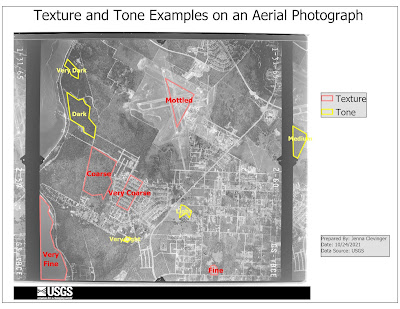
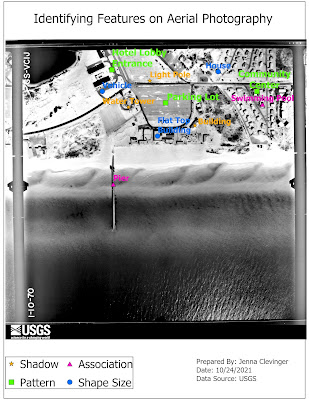
Start of a new GIS Course: GIS 4035 Photo Interpretation and Remote Sensing. This first lab we created 2 maps, the top one showing examples of textures, tones, and the bottom map shows examples of features that can be interpreted by shape or size, shawdow, pattern an association in aerial photos given to us. Seeing how features look on photos can help interpret them to what they are showing. This can be seen in the homes, buildings, swimming pools, piers and even parking lots I chose. They all have distinct characteristics as we have learned this lab that define their identity. Great first introduction assignment executed well!

GIS Portfolio

The final assignment in the GIS Certificate Program was to create a GIS Portfolio. It went as I expected. It is hard to write about yourself...